Spring Boot 集成 MinIo
快速部署
使用Docker快速部署一个MinIO服务
docker run -p 9000:9000 -p 9001:9001 \
     -d --restart=always \
     -v /usr/local/minion/data:/data \
     -v /usr/local/minio/config:/root/.minio \
    --name minio \
    minio/minio server /data --console-address ":9001"
# 设置账号密码
  -e "MINIO_ROOT_USER=myuser" \
    -e "MINIO_ROOT_PASSWORD=mypassword" \

# 不设置密码,账号密码默认minioadmin
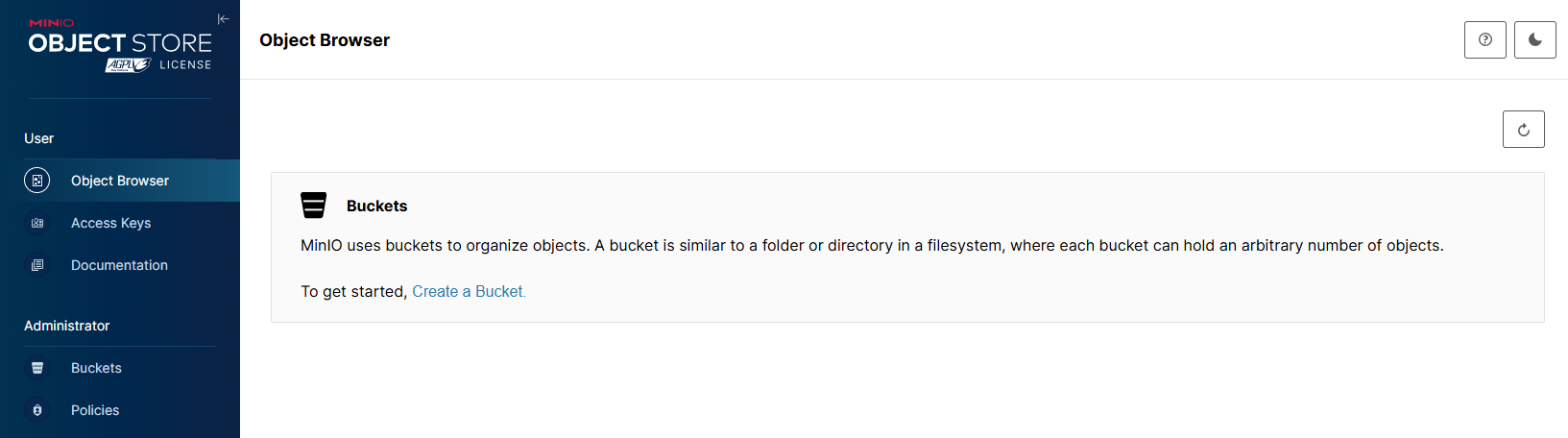
通过 http://ip:9001 访问可视化界面
如果没设置账号密码默认都是minioadmin
Spring Boot 集成
因为Spring Boot 官方并未直接集成 MinIO,所以无法使用spring-boot-starter-的方式。
需要自己导入依赖并创建配置文件
pom文件
<!-- minio -->
<dependency>
    <groupId>io.minio</groupId>
    <artifactId>minio</artifactId>
    <version>8.5.9</version>
</dependency>

------------------------------------------------
<!-- 在创建的过程冲Spring Boot 和 minio 产生了 okhttp 的依赖冲突,下面是解决办法 -->
<!-- minio 排除okhttp 依赖 -->
<dependency>
    <groupId>io.minio</groupId>
    <artifactId>minio</artifactId>
    <version>8.5.9</version>
    <exclusions>
        <exclusion>
            <artifactId>okhttp</artifactId>
            <groupId>com.squareup.okhttp3</groupId>
        </exclusion>
    </exclusions>
</dependency>

<!-- okhttp 单独添加 -->
<dependency>
    <groupId>com.squareup.okhttp3</groupId>
    <artifactId>okhttp</artifactId>
    <version>4.9.3</version>
</dependency>
yml配置
下面是一份简单带有minio的application.yml
server:
  port: 8080

spring:
  application:
    name: springboot-minio

  datasource:
    url: jdbc:mysql://192.168.0.88:3306/minio-demo?useUnicode=true&characterEncoding=utf-8&useSSL=false&serverTimezone=Asia/Shanghai
    username: root
    password: 123456
    driver-class-name: com.mysql.cj.jdbc.Driver

  servlet:
    multipart:
      max-file-size: 100MB
      max-request-size: 100MB

mybatis-plus:
  mapper-locations: classpath:mapper/*.xml

# minio配置
minio:
  endpoint: http://192.168.0.88:9000
  accessKey: minioadmin
  secretKey: minioadmin
  bucketName: default
创建配置类
这个配置类需要读取yml中的minio的属性值
import io.minio.MinioClient;
import lombok.Data;
import org.springframework.boot.context.properties.ConfigurationProperties;
import org.springframework.context.annotation.Bean;
import org.springframework.context.annotation.Configuration;


/**
 * minio配置类,因为spring boot没有starter
 * 所以需要创建配置类,为 MinioClient 配置
 * @Author: LiuXin
 */
@Data
@Configuration
@ConfigurationProperties(prefix = "minio")
public class MinIOConfig {

    private String endpoint;

    private String accessKey;

    private String secretKey;

    private String bucketName;

    @Bean
    public MinioClient minioClient() {
        return MinioClient.builder()
                .endpoint(endpoint)
                .credentials(accessKey, secretKey)
                .build();
    }

}
创建工具类
这个工具类是需要创建前面的配置类MinIOConfig
import com.liu.config.MinIOConfig;
import io.minio.*;
import io.minio.http.Method;
import org.apache.commons.io.FilenameUtils;
import org.springframework.beans.factory.annotation.Autowired;
import org.springframework.stereotype.Component;
import org.springframework.web.multipart.MultipartFile;

import javax.annotation.PostConstruct;
import javax.servlet.http.HttpServletResponse;
import java.io.IOException;
import java.io.InputStream;
import java.net.URLEncoder;
import java.nio.charset.StandardCharsets;
import java.util.Objects;
import java.util.UUID;

/**
 * Minio工具类
 * 注意: 本工具类基于 Minio 8.5.9 实现, 其他版本 Minio API 可能会有差异
 * @Author: LiuXin
 */
@Component
public class MinioUtils {


    /**
     * 默认桶
     */
    private static String defaultBucketName;

    private static MinioClient minioClient;

    @Autowired
    private MinIOConfig minIOConfig;

    @Autowired
    private MinioClient initMinioClient;

    @PostConstruct
    public void init() {
        minioClient = initMinioClient;
        defaultBucketName = minIOConfig.getBucketName();
    }


    /**
     * 上传文件到默认桶
     * @param file 文件对象
     * @return 生成的UUID文件名,用于项目架构中的file表记录
     */
    public static String upload(MultipartFile file) throws Exception {
        return upload(file, defaultBucketName);
    }

    /**
     * 上传文件到指定桶
     * @param file 文件对象
     * @param dBucketName 桶名称
     * @return 生成的UUID文件名,用于项目架构中的file表记录
     */
    public static String upload(MultipartFile file, String dBucketName) throws Exception {

        String uuidFileName = null;

        // 判断默认桶是否存在
        if(!bucketExists(dBucketName)){
            throw new RuntimeException(dBucketName + "桶不存在");
        }

        try (InputStream stream = file.getInputStream()){
            // 获取文件名
            String fileName = file.getOriginalFilename();
            if ("".equals(fileName)) {
                fileName = file.getName();
            }

            // 生成UUID作为文件名
            uuidFileName = UUID.randomUUID().toString().replaceAll("-", "") + "."
                    + Objects.requireNonNull(FilenameUtils.getExtension(fileName));

            minioClient.putObject(PutObjectArgs.builder()
                    .bucket(dBucketName)
                    .object(uuidFileName)
                    .stream(stream, file.getSize(), -1)
                    .contentType(file.getContentType())
                    .build());
        } catch (Exception e) {
            throw new RuntimeException("上传文件失败失败:" + e.getMessage());
        }

        return uuidFileName;
    }

    /**
     * 下载文件
     * @param bucketName 桶名称
     * @param objectName 文件名称
     */
    public static void download(String bucketName, String objectName, HttpServletResponse response) throws Exception {

        response.setContentType("application/octet-stream");
        response.setCharacterEncoding("utf-8");
        response.setHeader("Content-Disposition", "attachment;filename=" +
                URLEncoder.encode(objectName, String.valueOf(StandardCharsets.UTF_8))
        );

        try (InputStream objectStream = getObject(bucketName, objectName)) {
            // 使用适当的缓冲区大小
            byte[] buffer = new byte[1024 * 1024];
            int bytesRead;
            while ((bytesRead = objectStream.read(buffer)) != -1) {
                response.getOutputStream().write(buffer, 0, bytesRead);
            }

        } catch (IOException e) {
            throw new RuntimeException("下载文件失败:" + e.getMessage());
        }

    }

    /**
     * 获取文件外链
     * @param bucketName 桶名称
     * @param objectName 文件名称
     * @return 文件外链
     * 此方法用于桶权限是私有的
     * 桶权限是私有的,则需要通过此方法获取带签名的外联
     * 桶权限是公开读 可通过 ip/bucketName/fileName 直接访问
     */
    public static String getObjectUrl(String bucketName, String objectName) throws Exception {

        String fileUrl = null;

        fileUrl = minioClient.getPresignedObjectUrl(GetPresignedObjectUrlArgs.builder()
                        .bucket(bucketName)
                        .object(objectName)
                        .method(Method.GET) // 必要参数,访问的方式
                        .expiry(60 * 60 * 24) // 过期时间,非必要参数,秒为单位,不设置默认为7天
    //                .expiry(3, TimeUnit.MINUTES) // 也可以设置单位,这里表示3分钟过期
                        .build()
        );

        return fileUrl;
    }

    /**
     * 删除文件
     * @param bucketName 桶名称
     * @param objectName 文件名
     */
    public static void removeObject(String bucketName, String objectName) throws Exception {
        minioClient.removeObject(RemoveObjectArgs.builder()
                .bucket(bucketName)
                .object(objectName)
                .build());
    }

    /**
     * 获取文件流
     * @param bucketName 桶名称
     * @param objectName 文件名称
     * @return 文件流
     */
    public static InputStream getObject(String bucketName, String objectName) throws Exception {
        InputStream inputStream = null;

        inputStream = minioClient.getObject(GetObjectArgs.builder()
                .bucket(bucketName)
                .object(objectName)
                .build());

        return inputStream;
    }

    /**
     * 判断桶是否存在
     * @param bucketName 桶名称
     */
    public static boolean bucketExists(String bucketName) throws Exception {
        return minioClient.bucketExists(BucketExistsArgs.builder()
                .bucket(bucketName)
                .build());

    }

    /**
     * 创建桶
     * @param bucketName 桶名称
     * 桶默认权限为私有的,如果需要公开访问,需要设置桶的权限
     * 私有具体体现为 不使用带签名的标签无法访问桶内文件
     * 修改方法可以通过setBucketPolicy来设置权限
     * 或通过Minio控制台来设置桶权限
     */
    public static void makeBucket(String bucketName) throws Exception {
        // 判断桶是否存在
        if (!bucketExists(bucketName)) {
            minioClient.makeBucket(MakeBucketArgs.builder()
                    .bucket(bucketName)
                    .build());
        }

    }

    /**
     * 设置桶全新为公开都
     * @param bucketName 桶名称
     */
    public static void setBucketPolicy(String bucketName) throws Exception {

        String policy = "{\"Version\":\"2012-10-17\",\"Statement\":[{\"Sid\":\"PublicRead\",\"Effect\":\"Allow\",\"Principal\":{\"AWS\":\"*\"}," +
                "\"Action\":[\"s3:GetObject\"],\"Resource\":[\"arn:aws:s3:::" + bucketName + "/*\"]}]}";

        minioClient.setBucketPolicy(SetBucketPolicyArgs.builder()
                .bucket(bucketName)
                .config(policy)
                .build());

    }

    /**
     * 删除桶
     */
    public static void removeBucket(String bucketName) throws Exception {
        minioClient.removeBucket(RemoveBucketArgs.builder()
                .bucket(bucketName)
                .build());
    }


    /**
     * 判断文件名是否带盘符,重新处理 (暂时弃用)
     *
     * 因为上传方法中只需要获取文件最后名
     * 文件名使用UUID替代,所以不会有盘符的问题
     */
    private static String getFileName(String fileName) {
        //判断是否带有盘符信息
        // Check for Unix-style path
        int unixSep = fileName.lastIndexOf('/');
        // Check for Windows-style path
        int winSep = fileName.lastIndexOf('\\');
        // Cut off at latest possible point
        int pos = (Math.max(winSep, unixSep));
        if (pos != -1) {
            // Any sort of path separator found...
            fileName = fileName.substring(pos + 1);
        }
        //替换上传文件名字的特殊字符
        fileName = fileName.replace("=", "").replace(",", "").replace("&", "").replace("#", "");
        return fileName;
    }

}
评论
匿名评论
隐私政策
你无需删除空行,直接评论以获取最佳展示效果